In-house IT teams

A help desk for the IT team inside your organization.

For companies and organizations of 50 to 500 people with their own IT staff: tickets from email and a portal, laptops tracked from purchase to retirement, and a per-agent price that is on the website.

Starter is free forever for up to 3 agents, with no card. Pro is $29 per agent per month billed annually, or $35 monthly. The sign-up link opens with Company chosen as the organization type; pick another there if yours is a nonprofit, a city or a college.

What you get

The work an IT team of two to twenty does every day.

Tickets, devices, a portal and a knowledge base on one record, with HR and facilities requests on the same engine.

Running IT at a construction company? Beacon for construction companies says what fits on a jobsite and what Beacon does not do there yet.

Email to ticket

Forward support@ to your Beacon address. Every message becomes a ticket with an SLA clock, and replies join the thread. HR and facilities can each have an address of their own. How it works.

A portal that answers first

Employees pick a card, such as Accounts and access, Hardware or HR requests, and answer its questions. Matching knowledge base articles appear while they type, so some requests never become tickets. Request forms.

HR on the same desk, kept private

Mark the HR Requests team private and its tickets stay with its members, the organization's owners and, unless you turn that off, administrators. New hire and Offboarding come ready under Accounts and access; add a start date or a manager's name to their form. Departments.

Laptops, purchase to retirement

Assignment, check-out and check-in, repair status, warranty, vendor and funding source, tied to every ticket about the device. Labels print with a barcode and a QR code that opens the device. Devices.

AI that sorts, a person who answers

Every ticket arrives with a suggested category, priority, team and article. No ticket is closed by AI and no reply goes out without a person. Administrators can turn off triage, suggested replies and deflection.

Sign-in and integrations

Google and Microsoft Entra ID sign-in on every plan; any OpenID Connect provider, such as Okta, plus a documented REST API and signed webhooks on Pro. With Auto-create users on, employees get an account the first time they sign in. API.

The dashboard

What is open, unassigned, overdue and due today, the month's ticket volume, and where the work went by category, site and priority.
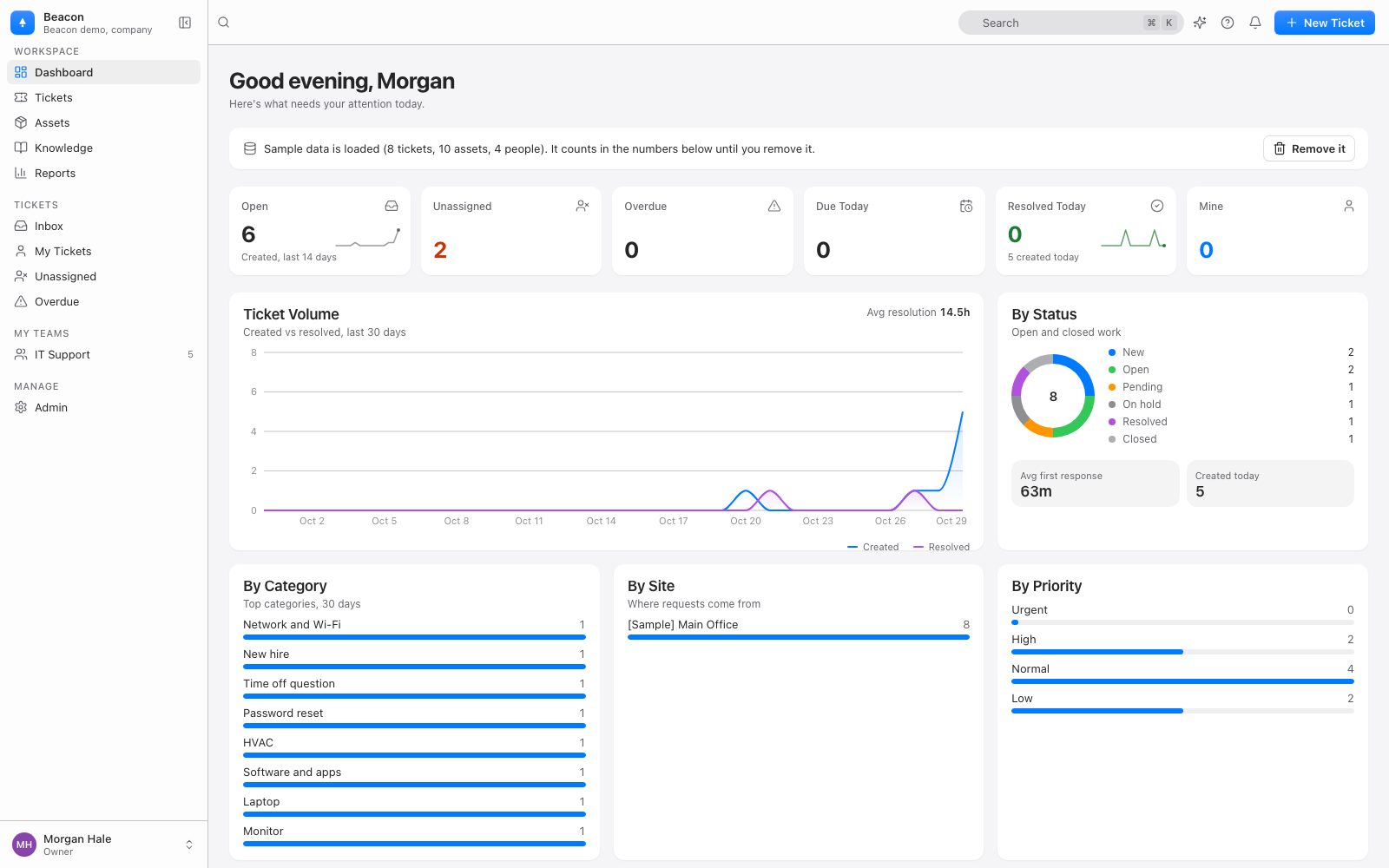
Beacon's dashboard for a company with sample data loaded: counts of open, unassigned, overdue and due-today tickets, the ticket volume over 30 days, and requests by status, category, site and priority

One list, every team

IT Support, HR Requests and Facilities on one ticket list, each request with its requester, status, priority, assignee, team and SLA. A private HR team's requests show only to the people who may read them.
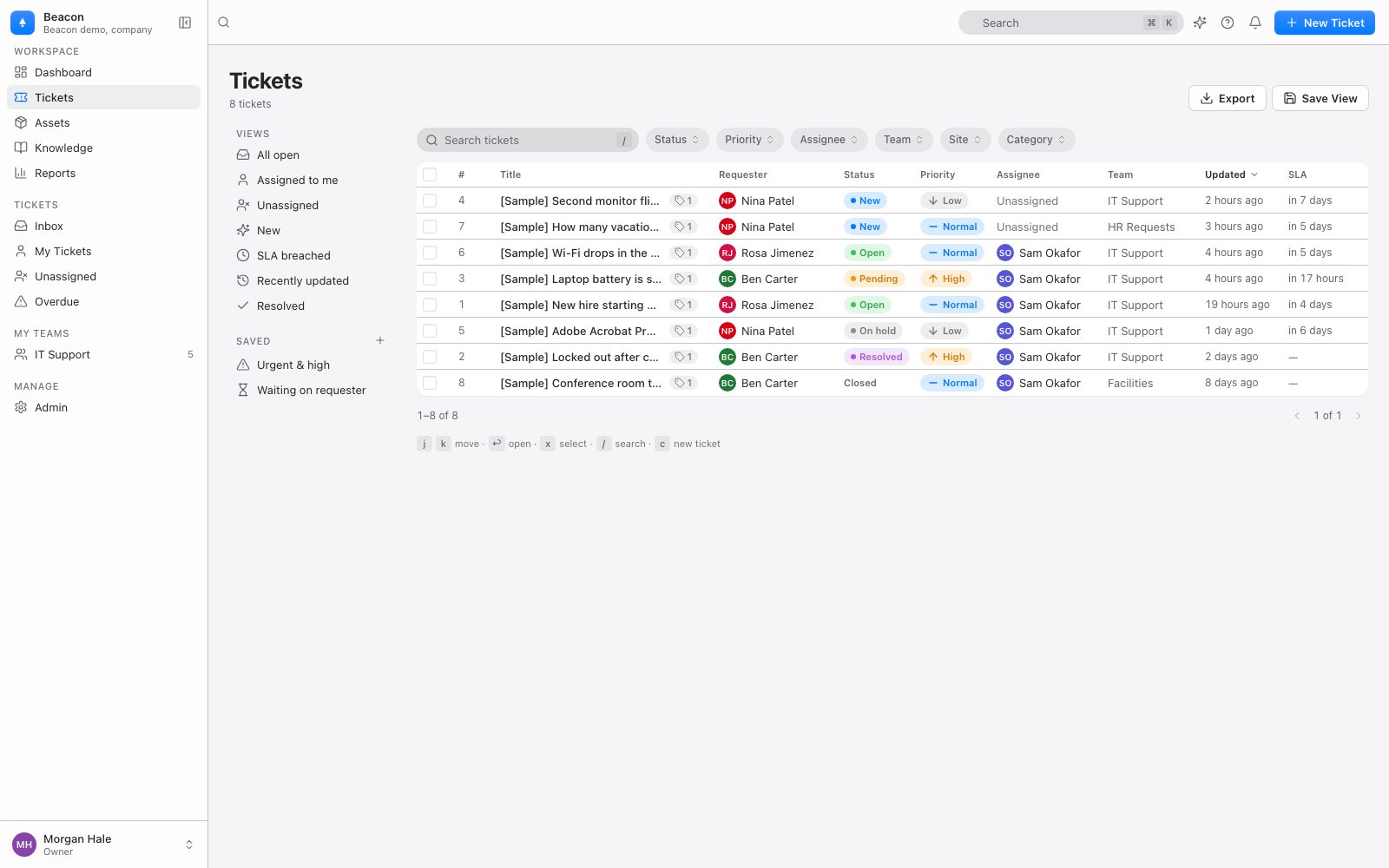
Beacon's ticket list with eight sample requests, each with its requester, status, priority, assignee, team (IT Support, HR Requests or Facilities) and the time left on its SLA

Starter and Pro

What each plan includes, as published.

Every price here is on the pricing page. Requesters are never billed on any plan.

StarterPro
PriceFree forever, no card$29 per agent per month billed annually, or $35 monthly
AgentsUp to 3As many as you need, each billed
SitesUp to 3Unlimited
DevicesUp to 1,000Unlimited
RequestersUnlimitedUnlimited
ModulesTickets, devices, knowledge base, portal, facilities and HR requestsEvery module
SLA policies and automations1 policy, 3 automationsUnlimited
Sign-inGoogle or MicrosoftGoogle, Microsoft, any OpenID Connect provider
API and webhooksNoYes
AITriage and deflection, with a small fair-use allowanceTriage, suggested replies, article drafts, deflection and Ask Beacon reports; 100 actions per agent per month, pooled; $0.02 per action above that, capped
Device sync (Google Admin, Intune, Mosyle)NoNo
People syncNightly from Microsoft Entra; not from Google WorkspaceNightly from Microsoft Entra; not from Google Workspace
SupportCommunity supportEmail, answered within one business day; 99.5% uptime target
Your dataFull JSON export and CSV, any timeFull JSON export and CSV, any time

An agent is anyone who works tickets: the owner, admin and agent roles. Moving from Starter to Pro is an email to billing@beaconhelpdesk.com: there is no card to enter in the app, and your data stays where it is.

Not on Pro

What Pro does not include, and what Beacon does not do yet.

So nobody finds out in the second week.

Device sync, and people from Google

The nightly, read-only syncs from Google Admin, Microsoft Intune and Mosyle are part of the District plan for schools and of Enterprise (quote-based, from $15,000 per year), not Pro. Starter and Pro do not include the people sync from Google Workspace either, since it reads through the same Google Admin connection. The nightly people sync from Microsoft Entra works on every plan; on Starter, a person it would make a technician past the three included agents comes in as a requester until a seat is free. On Pro, devices come in from a CSV or a paste from a spreadsheet, matched by asset tag or serial number, and a re-run updates rather than duplicates.

Not built yet

No device sync from SCCM or Jamf, on any plan. No SCIM provisioning. No Android app: the iPhone and iPad app is on the App Store, and on Android the mobile web app works without the camera scanner, offline mode or push notifications. No approval chains: a purchase request is a ticket like any other. The About page lists more.

Switching

From another help desk, a spreadsheet or a shared inbox.

Admin › Import takes any CSV with a header row: users, then devices, then tickets with their original dates. Nobody is emailed by an import, and re-running a file is safe. Importing.

From another help desk

Spiceworks, Freshservice and Web Help Desk export CSV that the import reads. Map the columns once; tickets keep their created, resolved and closed dates, and an old number stays on the record.

From KACE

Columns from the KACE appliance's Users, Assets and Tickets lists are recognized, and a later export updates tickets by number. Switching from KACE.

From a shared inbox

Forward the mailbox everyone writes to and keep the address people already know. Each message becomes a ticket, and replies thread on their own.

Questions

Asked by IT managers.

What counts as an agent?

Anyone who works tickets: the owner, admin and agent roles. Employees who submit requests are requesters and are never billed, on any plan. Starter includes up to 3 agents; on Pro you pay for each agent.

Does Pro sync our laptops from Intune or Google Admin?

No. Device sync from Google Admin, Microsoft Intune and Mosyle is part of the District plan for schools and of Enterprise, not of Starter or Pro. On Pro, devices come in from a CSV or a paste from a spreadsheet, matched by asset tag or serial number, and a re-run updates rather than duplicates. People come in the same way, or sync nightly from Microsoft Entra, which works on every plan, or get an account the first time they sign in with single sign-on. Starter and Pro do not include the people sync from Google Workspace, which reads through the Google Admin connection.

How do we move from Starter to Pro?

Email billing@beaconhelpdesk.com. There is no card to enter in the app; a person sets up the order, monthly or annual, and the organization keeps all its data. Pro is $29 per agent per month billed annually, or $35 monthly. Billing and plans.

Can HR requests stay private from IT?

Yes. Mark the HR Requests team private and its tickets are read by its members, the organization's owners and, unless you turn that off, administrators: they are not in IT's lists, search, reports, exports or notifications. Technicians can still route a payroll question to HR and then no longer see it. Private teams.

Is AI extra?

No. Pro includes 100 AI actions per agent per month, pooled across the team: triage, suggested replies, article drafts, deflection and natural-language reports. Overage is $0.02 per action, capped at one month's allowance unless an administrator raises it. Administrators can turn off triage, suggested replies and deflection, and Beacon does not train models on your data. AI and your data.

Can we get our data out?

Yes, on every plan, Starter included: a JSON export of everything and CSV from Reports. If you cancel, the export stays available for 90 days.

Do we need a sales call?

No. Beacon does not run sales calls or demos with a person. Watch the 60-second video, start free, and email hello@beaconhelpdesk.com with questions; a person answers within one business day.

Get started

Start free today.

Create your organization, forward support@, and import your device list. No card, no sales call. Your data is always exportable.