Help desk · devices · facilities · knowledge
The help desk a district runs itself.
Tickets, devices, facilities and knowledge in one login. $1 per student per year, every module.
School district? Look inside a demo district first.

Help desk · devices · facilities · knowledge
Tickets, devices, facilities and knowledge in one login. $1 per student per year, every module.
School district? Look inside a demo district first.
New on October 2 · 2026
Built for institutions
Carts, loaners, repairs, warranties, labels. Google, Microsoft, Clever, ClassLink sign‑in.
Many campuses, one tenant, shared knowledge.
Departments, residence halls, labs. SSO, open API, SLA targets.
IT, facilities, fleet. Audit trails, public‑records exports, on‑premises.
Per‑agent pricing, unlimited employees, laptops from purchase to retirement.
Features
Every screenshot is Beacon on October 4, 2026, in a fictitious district. Each feature has a guide.
Thirty Chromebooks in a cart, a student’s own device, one list. How locations work.

Code 128 and QR. Dymo 30252 and 30336, Brother DK‑1201, Avery 5160 and 5163, or custom. Printing labels.

Out to a student with a due‑back date, still in Cart 3.

A USB or Bluetooth scanner types the tag; the iPhone app’s camera (the app is in testing on TestFlight) reads it on the floor. Open, check out, or place in a cart.


Guides, what changed, Email a person. hello@beaconhelpdesk.com answers within one business day.

Tickets per site, resolution time by agent. What it can answer.

A reason, a request ID, a person, search results. When AI is unavailable.

Every Chrome device appears as an asset, read‑only. How the sync works.

Five steps from your own records, then a live summary for two weeks. The panel, explained.

Category, priority, team, duplicates, a fix, a confidence score. One click to confirm.
Point your phone at a tag: holder, location, history, open tickets.
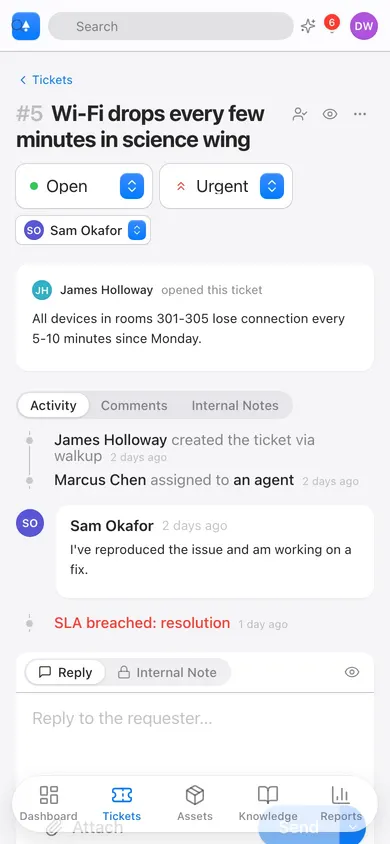
Route facilities to facilities. Escalate anything urgent. Build it in a form.
Articles appear as staff type. Resolved tickets become drafts.
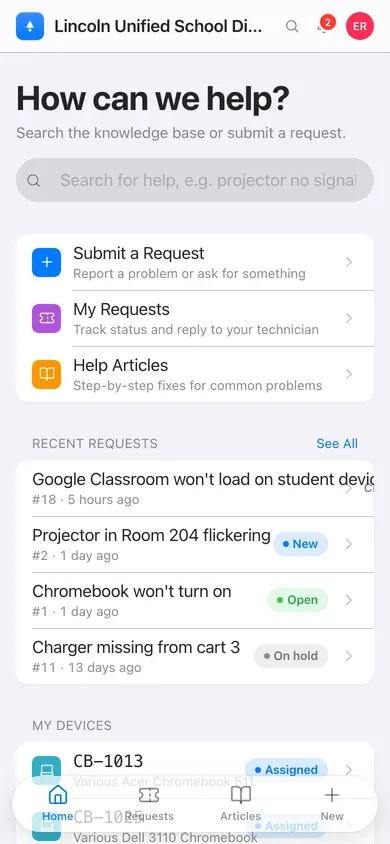
iPhone and iPad app (in testing on TestFlight), and a mobile web app.
Performance

Security & privacy
Postgres row‑level security refuses another tenant’s rows.
Google Workspace, Microsoft Entra ID, Clever, ClassLink. No passwords.
Student records stay in your tenant, and AI never trains on your data. Privacy Policy, security whitepaper, data processing terms on request.
Admin actions, permission changes, impersonation: logged, exportable.
CSV and API export, any time. No exit fees.
Encrypted volumes, daily encrypted backups, or your own data center.
Compare
| Capability | Beacon | Incident IQ | Freshservice | Zendesk | Jira Service Mgmt | Web Help Desk |
|---|---|---|---|---|---|---|
| Pricing model | Free · $29/agent · $1/student | Per student, quote only | Per agent, published | Per agent, published | Per agent, published | Per technician, perpetual |
| Public pricing | Yes | No | Yes | Yes | Yes | Partial |
| Unlimited requesters | Every plan | Yes | Yes | Yes | Yes | Yes |
| Asset management included | Every plan | Separate module | Higher tiers | No | Add‑on | Basic |
| Facilities & HR requests | Included | Separate modules | Partial | No | Partial | No |
| K‑12 single sign‑on (Clever, ClassLink) | Included | Yes | No | No | No | No |
| AI triage, replies, and reporting | Included | Limited | Paid add‑on | Paid add‑on | Premium | No |
| Mobile app with scanner | iOS app (in testing on TestFlight) + mobile web | Basic app | Yes | Yes | Yes | No |
| On‑premises option | Yes | No | No | No | Data Center | Yes |
| Time to go live | An afternoon | Weeks, with onboarding fee | Days | Days | Days | Days |
| Free tier | Forever | No | Trial only | Trial only | Up to 3 agents | No |
Competitor details from public pricing pages and publicly shared district quotes as of September 2026. Incident IQ does not publish prices. Product names are trademarks of their respective owners.
Pricing
No modules to buy, no per‑asset or per‑requester surprises. Free 90‑day pilot, no sales call.
For a single school or a small team.
$0.85 above 5,000 students, $0.70 above 20,000. $900 per year minimum.
Billed annually. $35 monthly. For companies and higher ed.
Do the math
Published District rates over three years. Enter what you pay today to compare.
Enter what you pay today to see the three-year difference.
Switching
The CSV exports you already have.
Sites, categories, device types matched. A Room column becomes locations.
Run both side by side for 30 days.
Get started
No credit card. Cancel anytime. A small Illinois company: about Beacon, help center, what changed, by date.