Construction companies

One IT desk for the office, the field and every jobsite trailer.

For contractors with their own IT staff. Office and field staff send IT requests from a phone's browser or by email. Every laptop, iPad, hotspot and trailer kit is tied to a person and a location.

Starter is free forever for up to 3 agents, with no card and no sales call. Pro is $29 per agent per month billed annually, or $35 monthly. The sign-up link opens with Company chosen as the organization type.

Requests

From the office, the field and the trailer.

Field staff are rarely at a desk. They write from the phone they already carry. Each request gets an SLA clock and a suggested category and priority, and IT, HR and facilities requests go straight to their team.

From a phone's browser

The request portal works in any phone browser, with nothing to install. Staff pick a card, answer its questions, attach a photo and send. They follow their own requests and replies in the same place. Request forms.

Or by email

Forward the address people already use, such as it@ or helpdesk@, to your Beacon address. Every message becomes a ticket with an SLA clock, and replies join the thread. How it works.

Departments beyond IT

IT Support, HR Requests and Facilities come ready as teams, and the portal's cards send each request to the right one. Add a Yard department for trailers and equipment under Admin › Teams, with its own questions and its own people. Mark HR private and its requests stay with HR, the owners and, unless you turn that off, administrators. Departments.

A knowledge base that answers first

Write the VPN, Wi-Fi, printer and password steps once. Matching articles appear in the portal while people type, so some requests never become tickets. Knowledge base.

When the trailer has no signal

The iPhone and iPad app keeps working without a connection. New requests and tickets with their photos, replies, notes and device check-outs wait on the phone and go out in order when the signal comes back. Working offline.

Microsoft or Google sign-in

Staff sign in with Microsoft Entra ID or Google on every plan. People sync nightly from Microsoft Entra on every plan too, with their title, phone and the site you map them to, and someone disabled in Entra is disabled in Beacon. People from Microsoft Entra.

The request portal

The portal's Submit a Request page starts with your categories as cards. A tap opens that card's form, and a line under it says which team gets the request. Field staff see the same page without the Agent Workspace link, which only agents see.
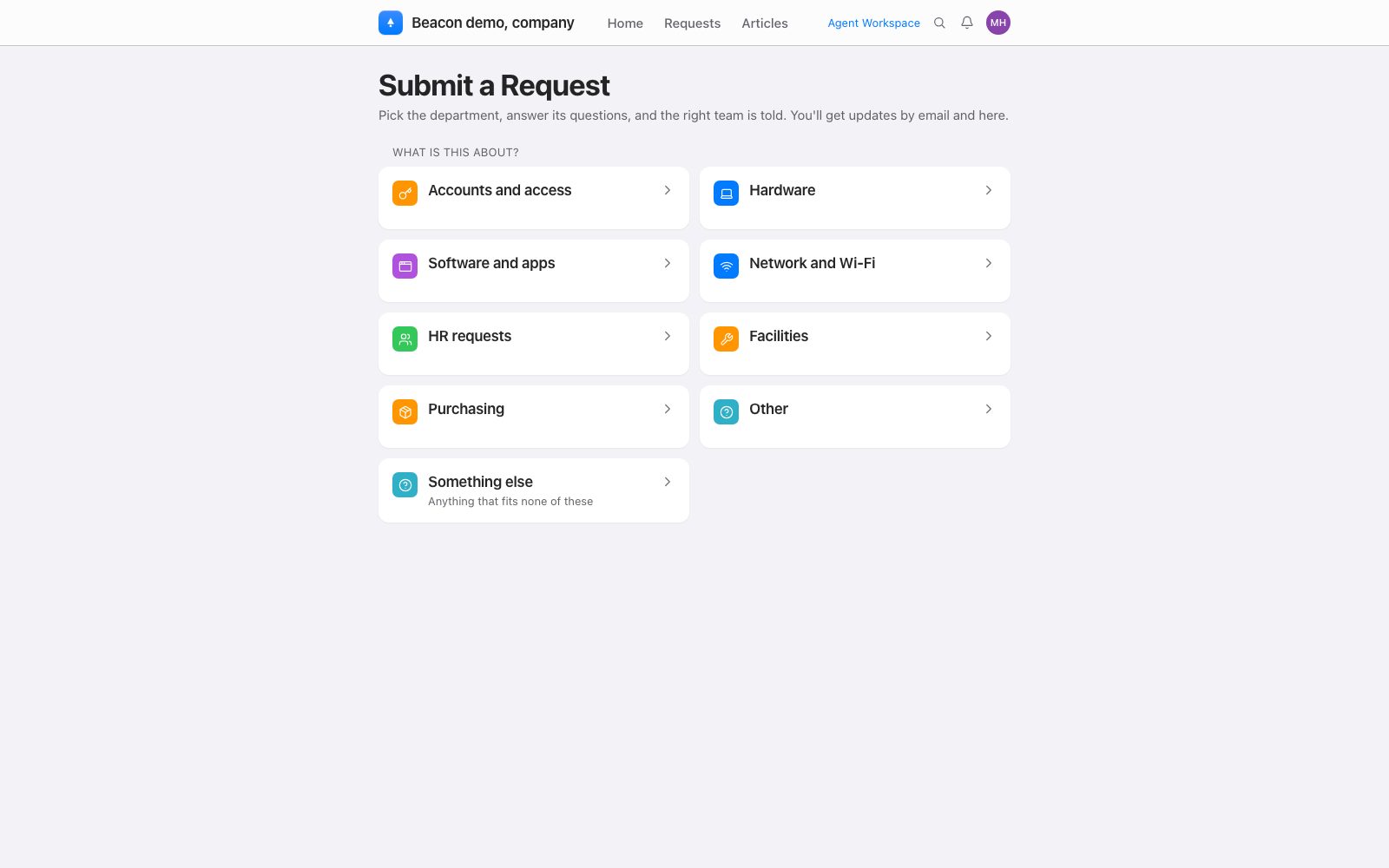
Beacon's request portal for a company on the Submit a Request page, as the owner sees it, with a card for each category: Accounts and access, Hardware, Software and apps, Network and Wi-Fi, HR requests, Facilities, Purchasing, Other and Something else

What the IT team sees

A request in the technician's view: who sent it, its status, priority and assignee, the reply, and beside them the category, the IT Support team and the laptop it is about.
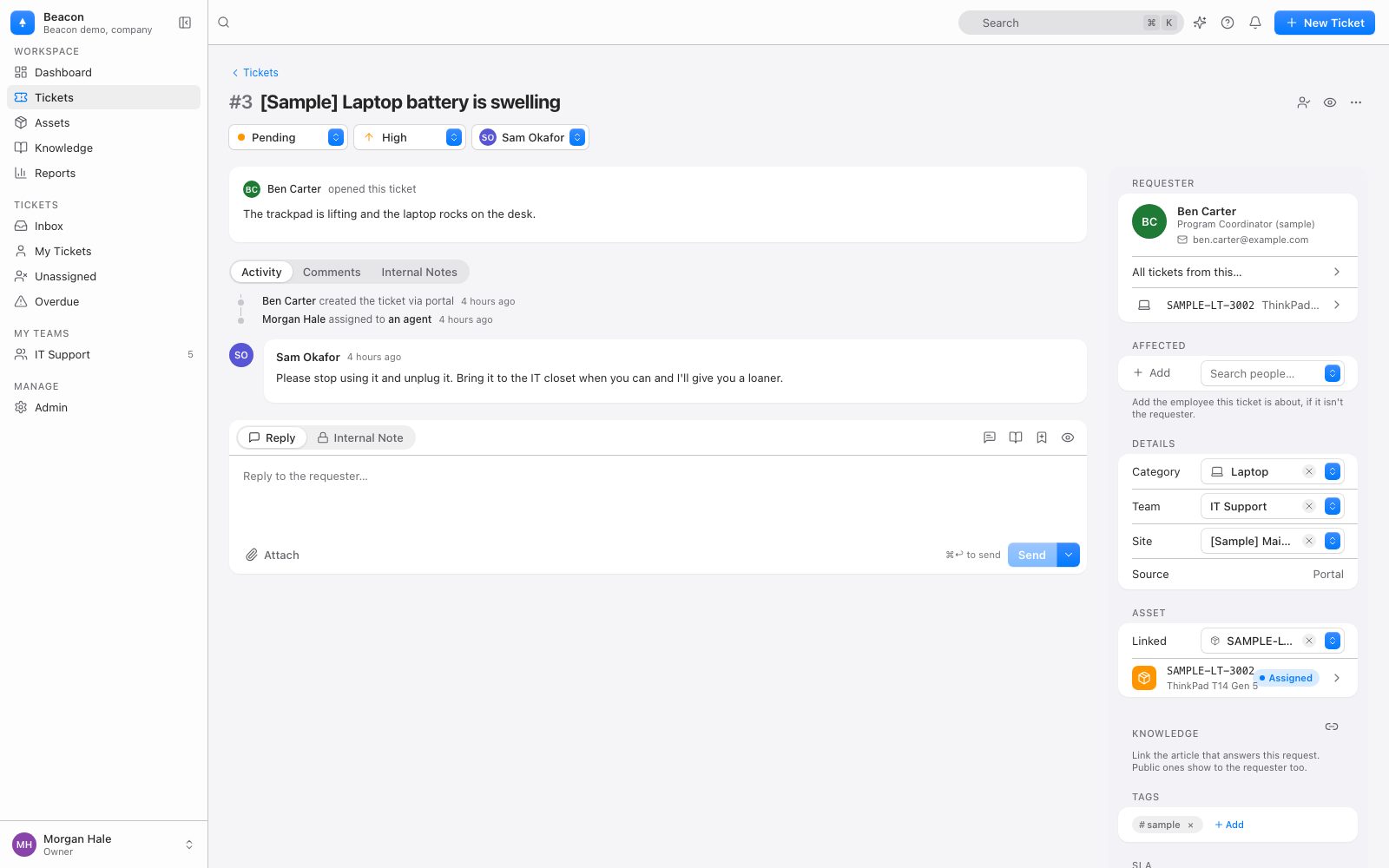
A sample request about a swelling laptop battery open in Beacon's technician view: pending, high priority and assigned, with the technician's reply, the requester, the Laptop category, the IT Support team and the linked laptop

Devices and kits

Every laptop, iPad, hotspot and trailer kit, with a person and a place.

Where a device sits and who holds it are two separate facts in Beacon. A trailer's printer and a superintendent's iPad sit in the same list. Assets and check-out.

A site and a location

Each device belongs to a site and a location within it: a jobsite trailer, a yard office, a supply closet. Starter includes up to 3 sites, so the office holds the other trailers as locations; Pro has unlimited sites, so each jobsite can be its own. Move one device or a whole selection at once; each move is recorded. Locations.

Check-out and check-in

A technician checks a device out to a person, with an optional note and an optional due-back date. Past that date, the device's page marks it overdue. Check-in sets the status and where it goes next: storage, repair, or the next trailer. Tick several devices in the list to check them all out to one person, or all back in.

A history for every device

Every check-out, check-in, move, status change and edit, with who did it and when. The tickets linked to the device are on the same page, open and past.

Types for what a trailer holds

Laptop, Desktop, Monitor, Phone, Printer and Network gear come ready, and laptops, desktops, monitors and phones can be checked out to a person. An import creates any other type it finds in your file, such as Tablet, Hotspot or Trailer kit.

Labels with a QR code

The asset tag as a Code 128 barcode, a QR code that opens the device in Beacon, the serial, make and model, your company's name and, if you choose, the holder and the location. Dymo, Brother and Avery stock, or a custom size. Printing labels.

Scan to find, check out or place

Scan on the Assets page takes a barcode scanner or a typed tag. It opens the device, checks each scanned device out to one person, or puts each one in one location. The iOS app's camera reads the same Code 128 and QR codes. Devices come in from a CSV or a paste from a spreadsheet. Importing.

Starter and Pro

Free for a small IT team. Pro after that.

Every number here is on the pricing page. An agent is anyone who works tickets. Office and field staff who send requests are requesters, and requesters are never billed.

StarterPro
PriceFree forever, no card$29 per agent per month billed annually, or $35 monthly
AgentsUp to 3As many as you need, each billed
Sites1Unlimited
DevicesUp to 1,000Unlimited
RequestersUnlimitedUnlimited
ModulesTickets, devices, knowledge base, portal, facilities and HR requestsEvery module, with unlimited SLA policies and automations
Sign-inMicrosoft or GoogleMicrosoft, Google, any OpenID Connect provider
People syncNightly from Microsoft Entra; not from Google WorkspaceNightly from Microsoft Entra; not from Google Workspace
Device sync (Intune, Google Admin, Mosyle)NoNo
AITriage and deflection, with a small fair-use allowanceTriage, suggested replies, article drafts, deflection and Ask Beacon reports; 100 actions per agent per month, pooled; $0.02 per action above that, capped
Your dataFull JSON export and CSV, any timeFull JSON export and CSV, any time

A team of five on Pro pays $1,740 a year. For comparison, Freshservice lists its Growth plan at $49 per agent per month billed annually, and a 14-day trial rather than a free plan [1]. Device sync from Intune is part of Enterprise for companies (quote-based, from $15,000 per year). Moving from Starter to Pro is an email to billing@beaconhelpdesk.com: there is no card to enter in the app, and your data stays where it is.

Not yet

What Beacon does not do for a construction company yet.

So nobody finds out in the second week.

Tools and equipment

  • No due-back reminders and no list of overdue returns. The due date and the overdue mark are on each item's own page, and the due date is in the CSV export.
  • No self check-out by field staff. A technician checks items in and out, and each person who does holds an agent seat.
  • No consumables or stock counts. Beacon tracks single items with a tag, not quantities of blades, gloves or toner.
  • No calibration or preventive maintenance schedules.
  • No GPS, Bluetooth or telematics tracking. An item is where someone last placed it.

Integrations and apps

  • No Procore integration, and no integration with other construction software. Pro has a documented REST API and signed webhooks.
  • No device sync from Intune on Starter or Pro; for companies it is part of Enterprise.
  • No construction starter set. A company starts with office categories, such as Accounts and access, Hardware and Purchasing; a Jobsite or Yard card is a department you add.
  • No offline mode in the browser: the portal and the technician workspace need a connection. The iOS app keeps working offline.
  • No Android app. The iPhone and iPad app is on the App Store; on Android, field staff and technicians use the mobile web app, which has no camera scanner, no offline mode and no push notifications.

Questions

What an IT team at a construction company will want to know.

Can field staff send requests from their phones?

Yes, from the phone's browser, with nothing to install: they sign in with their Microsoft or Google account, pick a card, answer its questions and can attach a photo. They can also write to the address you forward to Beacon. The iPhone and iPad app is on the App Store too, and it keeps a request that was written without a signal until the signal comes back.

Can we see who has each laptop, iPad and hotspot, and which trailer it is in?

Yes. Each device has a site and a location within it, such as a jobsite trailer or a yard office, and can be checked out to a person with an optional due-back date. Who holds it and where it sits are separate facts, and every check-out, check-in, move and status change is in the device's history with who did it and when. Locations.

Can Beacon run tool check-out for our tool room?

Only in part, today. A technician can check a tagged item out to a person with a due-back date, and the item's page marks a late return as overdue. There are no due-back reminders, no list of overdue returns, no self check-out by field staff, no consumables and no calibration schedules yet, and everyone who checks items in and out holds an agent seat.

Does Pro sync our devices from Intune?

No. Device sync from Microsoft Intune, Google Admin and Mosyle is not part of Starter or Pro; for a company it is part of Enterprise, quote-based from $15,000 per year. On Starter and Pro, devices come in from a CSV or a paste from a spreadsheet, matched by asset tag or serial number. People sync nightly from Microsoft Entra on every plan, Starter included. Importing.

What does Beacon cost for an IT team of five?

On Pro, 5 agents at $29 per agent per month billed annually is $1,740 a year, or $175 a month billed monthly at $35. Requesters are never billed. Up to 3 agents run free on Starter, with up to 3 sites and up to 1,000 devices. Moving from Starter to Pro is an email to billing@beaconhelpdesk.com, and your data stays where it is. Billing and plans.

Do we need a sales call?

No. Beacon does not run sales calls or demos with a person. Watch the 60-second video, start free, and email hello@beaconhelpdesk.com with questions; a person answers within one business day.

Sources

Where the comparison comes from.

  1. Freshservice pricing, freshworks.com, as of October 29, 2026: the Growth plan's list price billed annually, and the 14-day trial.

Get started

Start free today.

Create your organization, forward your IT mailbox, and import your device list. No card, no sales call. Your data is always exportable.