K‑12 districts

A district help desk for $1 per student per year.

Every module, unlimited agents. A free 90‑day pilot, no card, no sales call.

Ten minutes to a working help desk. On day 90 nothing converts on its own.

Or look inside a demo district first

A made-up district for 14 days.

On your phone? Email yourself the link.

Sixty seconds

See it work.

Scan a Chromebook, watch a ticket triage itself, swap a loaner.

New on October 2 · 2026

  • Devices in locations: a room, a cart, a closet, a lab.
  • Printed labels: a barcode and a QR code.
  • Help center and Help menu: a guide per topic, and a person.
  • Ask Beacon: search results when the AI cannot answer.
Everything, by date

Problems

What Beacon fixes.

01

The 1:1 program lives in a spreadsheet.

Five files become one record: site, location, holder, purchase date, cost, warranty, funding source. Scan the tag, see all of it.

02

The same tickets, every week.

Password resets, Wi‑Fi, projectors, chargers, a hundred times over. Triaged on arrival, with the fix shown while staff type.

03

Enterprise prices for slow software.

A public price: $1 per student per year, every module, no onboarding fee, free migration from Incident IQ.

Shipped

What technicians asked for.

Every screenshot is Beacon on October 4, 2026, in a fictitious district. Nothing here is a mock-up.

Locations

Where it is, who has it.

Site, location and holder per device. A cart of thirty Chromebooks and one student’s device share a list. Guide.

Beacon asset page for CB-1001 with a Where is it section showing Lincoln High School and Room 100 and a Who has it section showing the holder and a Check In button
Labels

Print it from the device.

Code 128, QR, serial, make, model, district name. Dymo 30252 and 30336, Brother DK‑1201, Avery 5160 and 5163, or custom. Guide.

Beacon print preview of four Dymo 30252 labels with asset tag, Code 128 barcode, QR code, serial number, model and district name
Help

A guide, and a person.

A searchable help center, a Help menu in the app, and hello@beaconhelpdesk.com, answered within one business day.

Beacon Help menu open over the tickets list: Help center, eight guides, What's new and Email a person
Ask Beacon

When the AI cannot answer.

Plain-English questions over tickets and devices. No answer? You get the reason, a request ID, a link to a person and search results. Details.

Ask Beacon dialog after the AI did not answer in time: the reason, a request ID, an Email a person link, and search results for the words chromebooks repaired
Chromebooks

Google Admin, every night.

Every Chrome device becomes an asset, refreshed nightly, read-only. A switch, off by default, also assigns a device with no annotated user to its most recent Google user. How the sync works.

Beacon's Chromebooks from Google Admin card with a Connect Google Admin button and the switch to also assign devices to their most recent Google user
First afternoon

Your first afternoon, measured.

Five steps from your own records, for your first two weeks. Sample data never counts. The panel, explained.

The Getting Beacon live panel on the dashboard: five steps done, the first staff request noted, and a Beacon is live summary

Modules

Everything included. These get the most use.

Tickets with AI triage

Sorted on arrival, a person deciding. Details

Devices and 1:1

Tags, serials, holders, loaners, repairs, warranties, labels, a scanner in the iOS app (in testing on TestFlight). Details · Chromebook asset management · Asset labels · Google Admin

Facilities work orders

HVAC, plumbing, keys, custodial, grounds, routed to the facilities team. Details

Knowledge base and portal

Articles that deflect, a portal for families. Details

Email to ticket

Forward help@yourdistrict.org to Beacon. Tickets open and thread on their own. Details

Single sign-on

Google Workspace, Microsoft Entra ID, Clever, ClassLink, restricted to your domains. Details

SLAs by category

Classroom Down around the clock, Standard on business hours. Details

Reports

Volume by site, SLA compliance, CSV export, plain-English questions. Details

Privacy

Built for student data.

Every district lives behind Postgres row-level security. Beacon acts as a school official under FERPA, follows COPPA and SOPIPA, signs the SDPC National Data Privacy Agreement and state addenda on request, and never trains AI on your data.

  • Every ticket and reply is screened for a student in crisis: urgent, administrators notified, the 988 Lifeline shown to the student.
  • Full export and self-serve deletion, on every plan.
  • No advertising, no trackers, no sale of data.
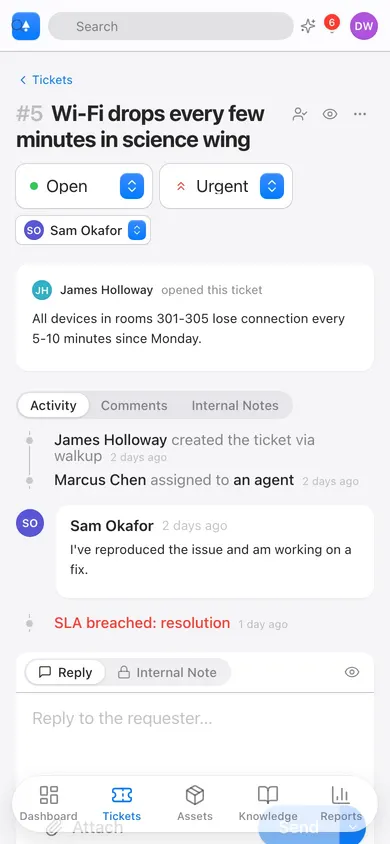
Beacon on iPhone showing a ticket with status, priority, timeline, and reply composer

Pricing

$1 per student per year. Every module.

$0.85 per student above 5,000, $0.70 above 20,000, applied marginally. The $900 minimum covers help desk, 1:1 devices and facilities.

Unlimited agents, sites, requesters and devices. Locked for three years.

On Incident IQ? Beacon is free until your term ends, up to 12 months. How the switch works · Importing your data · Beacon as an Incident IQ alternative.

Get started

Start a free 90-day pilot this afternoon.

The full District plan. Switching from Incident IQ? The migration takes an afternoon.

Rather look first? A demo district for 14 days, then deleted.